


By Zeeshan · Last updated October 21, 2026
Direct answer: Use Amazon’s Product Opportunity Explorer to investigate niche demand and customer needs; use ZonBase to build and check a product and keyword shortlist. They can complement each other, but a niche search figure and a single-product sales estimate measure different things and cannot predict your own sales.
Table of Contents
How do the tools compare at a glance?
| At a glance | Amazon Product Opportunity Explorer | ZonBase |
|---|---|---|
| Who can access it | Seller Central users with the relevant account access; check marketplace availability. | A separate ZonBase account; research can be evaluated separately from a selling account. |
| Cost | Amazon describes the tool as free; selling-plan and selling fees are separate. | A paid research suite; Standard advertised at $49/month. |
| What it measures | Amazon customer searches, browsing, purchases and related market signals. | Product and keyword research measures, including estimates. |
| Level of data | Niche and product/ASIN views, depending on the report. | Product candidates, keywords and supplier-list products, depending on the tool. |
| Keyword research | Search terms and volume in the opportunity-research context. | Dedicated Keywords and related research tools. |
| Supplier-list grading | Not documented as a supplier-cost-file grading workflow in the inspected guide. | Zon Grading helps assess supplier-list products. |
| Best used for | Understanding customer needs and market context. | Building and checking a shortlist and reviewing buying economics. |
Is Product Opportunity Explorer free, and why pay for ZonBase?
Amazon calls Product Opportunity Explorer a free product-selection tool. Access is through Seller Central. Amazon’s current US tool page lists a Professional selling account at $39.99/month plus selling fees, and its published training guide describes Professional-account access. Check your account permissions and marketplace rather than treating “free tool” as a free selling account.
ZonBase is an Amazon product research suite with tools for product research, keywords and supplier grading. It has a separate account and subscription, so you can evaluate its research workflow while you are still planning your selling account. Its Standard plan is advertised at $49/month, checked on October 19, 2026. Buy it for features or a workflow you will use, not because Amazon’s own data is inherently less valuable.
If Product Opportunity Explorer already answers your current question, start there. ZonBase may add value when you want dedicated keyword research, product filters or supplier grading. Neither a subscription nor a strong-looking metric guarantees a successful product.
You find a niche with plenty of searches on Amazon. Then a product-research tool shows estimated monthly sales for a competing ASIN. Both numbers look encouraging. Are they telling you the same thing? Our Amazon keyword research strategy guide gives useful background on keeping the research question clear.
No. One may describe interest across a group of searches and products. The other may estimate activity for a particular listing. Treating them as interchangeable can make an ordinary opportunity look far more certain than it is.
Amazon’s Product Opportunity Explorer and ZonBase can both support research. The important part is knowing what question each result answers before using it to plan a product or order stock.
ZonBase publishes this comparison. Tool descriptions are based on official product information. Examples explain research decisions, not verified selling results.
Is Product Opportunity Explorer better than ZonBase?
Use Product Opportunity Explorer to investigate customer needs and market context. Amazon describes niches built around related searches and products, along with product, search and customer-feedback information.
Use ZonBase to investigate the products and keywords on your shortlist. ZonResearch filters product options using measures such as price, estimated sales and reviews. Keyword tools support a different part of the research.
There is overlap, and Amazon also documents ASIN-level exploration. The distinction is not that one tool can only show niches and the other can only show products. It is that you must read each metric at the level and period it actually measures.
Review the selected plan, billing and cancellation terms before signing up.
What does Product Opportunity Explorer show?
Amazon’s Product Opportunity Explorer guide explains how the tool groups customer searches and products into niches. A single product or search term can appear in more than one niche.
The practical use is to investigate a customer need before choosing a product to meet it. What do shoppers search for? What do they click? What do reviews and return reasons suggest they find disappointing?
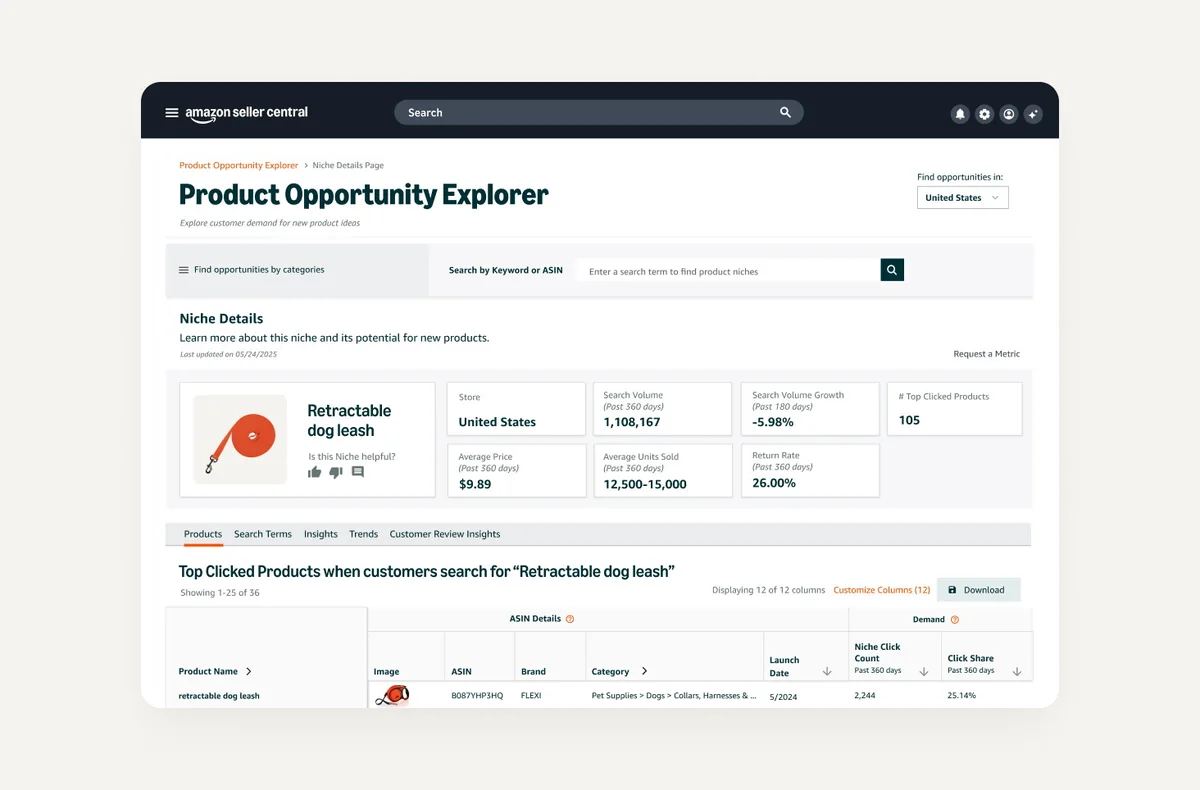
Amazon’s current tool page describes research into search behaviour, pricing, saturation and customer feedback. Access is through Seller Central, and Amazon’s published seller training guide describes Professional-account access. Check your account and marketplace rather than assuming every account has the same view.
A useful research note is specific: “Shoppers in this niche mention difficulty cleaning the product.” That gives you something to investigate in samples and specifications. “This niche gets searches, so my product will sell” skips the harder part of the decision.
What does ZonBase add to Amazon’s own data?
Suppose that customer need has led you to a few possible products. ZonResearch provides product filters, including price, estimated monthly sales and revenue, and reviews. You can use those filters to organise a shortlist for further checks. Our product research tools comparison covers related options.
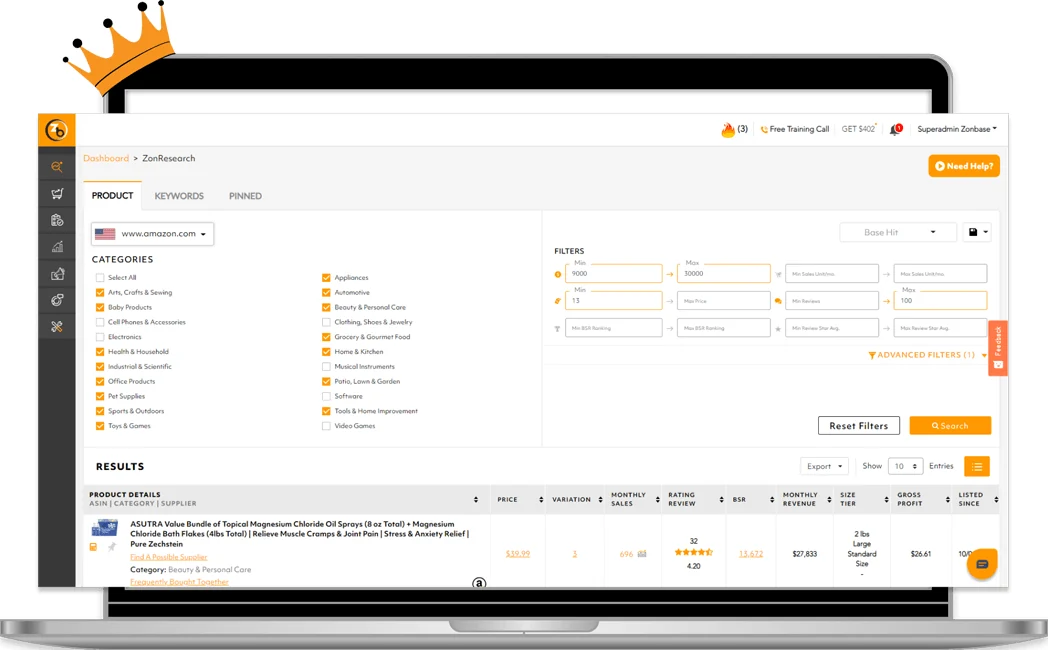
Then look at the actual products behind the rows. Are they the same size and use case as your proposed product? Do the listings belong to a few established brands? Could your planned product address the problem you identified, or is it simply another version of the same item?
If you move into keyword research, record that as another type of evidence. ZonBase’s Keywords tool describes search-volume estimates and filtering. A keyword estimate is not your listing’s future sales total.
Which numbers should never be compared directly?
| Evidence | Useful question | What it does not establish |
|---|---|---|
| Niche search information | What customer need is being expressed? | Your product’s future conversion rate. |
| ASIN-level estimates | Which products deserve a closer look? | The sales your own offer will receive. |
| Reviews and return themes | What problem might a better product address? | That your supplier’s sample solves it. |
| Your unit-cost calculation | Could the numbers work at a realistic price? | That sufficient buyers will choose your product. |
Write down the marketplace and date range beside each number. A year of niche searches and a monthly ASIN estimate do not become comparable just because they appear on the same worksheet.
How would I research a storage-product idea?
Imagine you are investigating a household storage product. Your first research note says shoppers want something that is easier to clean. That is a hypothesis to check, not a specification you should immediately send to a factory.
Fictional numbers, not market data: suppose a niche records 120,000 searches over 12 months, while a tool estimates 300 units sold per month for one competing ASIN. The first number counts searches across a niche and a year; the second estimates monthly units for one listing. Dividing or adding them will not give your conversion rate, market share or expected sales. Keep both figures labelled, then inspect the customer problem and competing product separately.
Use the niche research to identify the searches and products associated with that need. Read the feedback in context. A cleaning complaint about a fabric bag may not apply to the rigid container you had in mind.

Next, create a product shortlist. Compare dimensions, materials, listing promises, price and review themes. Request a sample only after you can explain what you are trying to improve and how you would assess it.
Finally, estimate costs at more than one selling price. Amazon’s Revenue Calculator can support a fee estimate; your supplier quote and other operating costs still need to be added correctly. Good research has to address the customer problem and the buying economics.
Which product-research shortcuts should I avoid?
Does a sales rank guarantee a sales total?
A rank or estimate can help you investigate demand. It should not be treated as a purchase order for the same number of units. Amazon’s sales-estimation guide discusses different signals and research tools; none turns your unlaunched offer into an established seller.
Is every similar product a direct competitor?
A low-cost multipack and a premium single unit may serve different buyers. Make sure your shortlist reflects the product and customer you intend to serve, not just a shared keyword.
Is an estimate the same as an actual result?
Keep separate columns for provider estimates, supplier quotes and observed results from your own business. That makes it easier to revisit a decision without forgetting which parts were assumptions.
Which tool should I start with?
If you already have access to Product Opportunity Explorer and need to understand a customer need, start there. Our guide to finding product candidates offers a related research process. If you have product candidates and need a structured shortlist, evaluate the ZonBase filters against those candidates.
For a broader suite comparison, see ZonBase vs Helium 10. You may use both during the same research project. Give each result a clear label, keep its date range and source, and decide what you still need to verify. That is more useful than combining unlike numbers into a confident forecast.
Frequently asked questions
Is Product Opportunity Explorer free to use?
Amazon describes Product Opportunity Explorer as a free product-selection tool accessed through Seller Central. Free tool access does not mean selling on Amazon has no costs: the US Professional selling plan is listed at $39.99 a month plus selling fees. Confirm your account permissions, marketplace availability and current selling-plan terms before relying on access.
Can I use Product Opportunity Explorer without a seller account?
You need access to Seller Central to use Product Opportunity Explorer; Amazon’s instructions direct users to sign in and open Growth. Its public guides can explain the tool without signing in, but they are not the research dashboard. ZonBase has its own account and subscription, which you can evaluate separately while planning an Amazon business.
Is a ZonBase sales estimate the same as Amazon’s own data?
No. A ZonBase sales estimate is a research estimate, while an Amazon niche metric describes the specific customer activity and period named in that report. Even two numbers from Amazon may describe different things. Keep the source, marketplace, date range and measurement unit beside each figure. Neither figure establishes the sales your own offer will receive.
Should I use Product Opportunity Explorer and ZonBase together?
Use both when they answer separate questions in your research. Product Opportunity Explorer can help investigate niche demand and customer feedback; ZonBase can help organise product candidates, keyword research and supplier-list checks. If Amazon’s tool already answers your immediate question, begin there. Add a paid tool only when its workflow or features justify the additional cost for you.
Review the selected plan, billing and cancellation terms before signing up.
