


By Zeeshan · Last updated October 20, 2026
Direct answer: Use ZonBase’s Zon Grading to narrow a supplier price list; use SellerAmp for a detailed check of an individual product, including offers, eligibility alerts and price history. Compare the tools on the same small supplier sample before choosing a subscription.
ZonBase is an Amazon product research suite with tools for product research, keywords and supplier grading.
Table of Contents
How do the tools compare at a glance?
| At a glance | ZonBase / Zon Grading | SellerAmp |
|---|---|---|
| Where you start | Supplier identifiers and cost of goods. | An individual ASIN, product URL or title. |
| Best fit | Narrowing a supplier list and extending research into products and keywords. | Investigating a specific sourcing candidate. |
| Supplier-list review | Zon Grading supports supplier-list analysis; plan allowances apply. | The inspected web-app guide documents item lookup and export; do not infer bulk-file import from export. |
| Single-product check | Product-research and profitability tools help build a shortlist. | Item-level profitability, competing offers and alerts. |
| Eligibility alerts | Do not treat supplier grading as selling approval; confirm in Seller Central. | Documented eligibility alerts; verify your own account in Seller Central. |
| Price history | Not established as a Zon Grading feature by the inspected page. | Documented historical price charts. |
| Starting monthly price | $49/month Standard. | $19.95/month Getting Started. |
Starting monthly US-dollar prices checked on October 19, 2026: SellerAmp Getting Started, $19.95/month; ZonBase Standard, $49/month. These are advertised monthly plans, not annual prices divided by twelve or a checkout quote. Confirm taxes, allowances, renewal and cancellation terms before subscribing.
A supplier sends over a price list. A few items look promising, and the margin column is already turning green. Is that enough to place an order? If you are new to this model, start with our guide to setting up an Amazon wholesale business.
Not quite. The spreadsheet may point to the right kind of product while missing a different pack size, a restricted listing or a selling price that leaves very little room for a discount.
If you are comparing SellerAmp and ZonBase for wholesale sourcing, start with that buying decision. The useful question is not which dashboard looks busier. It is which part of your supplier review each tool helps you complete.
ZonBase publishes this comparison. Product descriptions come from the providers’ official pages. The worked example below uses fictional figures.
Should I use SellerAmp or ZonBase for wholesale?
Zon Grading is worth considering when your starting point is a supplier file. ZonBase describes a process using product identifiers and cost of goods to assess product options. SellerAmp’s documented web app starts with an ASIN, product URL or title and brings together an item’s cost, offers, alerts and price history.
That makes a sensible evaluation plan: test how well Zon Grading helps you narrow a supplier list, then test the individual-product checks you need in SellerAmp. You may find one tool covers your needs, or that each has a separate job. Neither result should be assumed before you try your own products.
Review the selected plan, billing and cancellation terms before signing up.
What should I check before buying wholesale stock?
| Question | What to record | Why it matters |
|---|---|---|
| Is it the exact product? | Identifier, model, size and pack quantity. | A close match can still be the wrong listing. |
| Can I sell it? | Your current account eligibility and any required approval. | A positive margin does not give you permission to sell. |
| Does the price leave room? | Supplier cost, preparation, inbound costs and selling fees. | Missing costs make an attractive result misleading. |
| What happens if the price falls? | A second calculation at a lower selling price. | A narrow cushion may disappear before stock sells. |
How should I prepare a supplier price list?
For supplier ideas, see our wholesale website guide, then verify each supplier independently. Keep a copy of the supplier’s original file. Add a working sheet with an identifier, a clear description, the quoted cost, currency, units per case and any minimum order. If delivery or preparation is priced separately, record that separately too.
A case price is not automatically a unit cost. For example, a quoted carton of six needs to be compared with the quantity in the Amazon listing. Do not let a matching brand name stand in for that check.
Begin with a small sample you can verify by hand. Use items you understand, plus a few awkward entries with incomplete descriptions. You want to find out how much review remains after the software has done its part.

What does Zon Grading do with a supplier list?
The Zon Grading product page describes using UPCs or ASINs with cost of goods to help evaluate potential margins. The current plan comparison lists ASIN allowances for wholesale grading. Verify the allowance and what a grading result includes before choosing a plan.
For your trial task, look for a useful shortlist rather than the largest possible list of apparent opportunities. Which entries match the supplier’s item? Which need a pack-size check? Which depend on a price you would not be comfortable relying on?
Keep estimated sales separate from your own expected sales. Demand for a listing is not a promise that your offer will capture it, and an estimated margin is not money already earned.
When is SellerAmp the better tool?
SellerAmp’s web-app guide describes analysis by ASIN, URL or title, with saved cost and ROI settings, history and Google Sheets export. An export is useful for keeping research together; it should not be mistaken for proof that a particular supplier-file import process is supported.
The Offers panel can help with a specific question: what would your numbers look like at another seller’s price? SellerAmp says it shows fulfilment type, estimated stock, price, and your calculated profit and ROI at those prices.
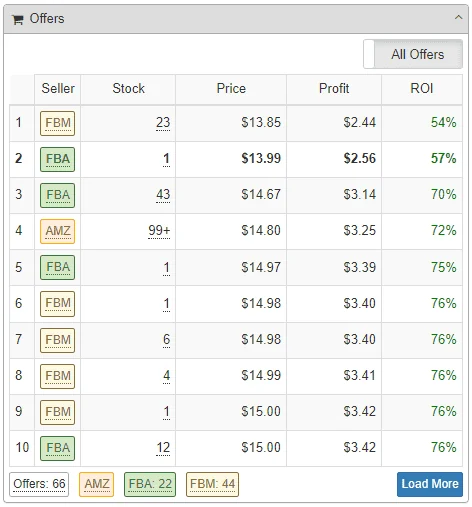
Its feature descriptions also cover eligibility alerts, product details and historical charts. Treat alerts as prompts for investigation. Check the exact ASIN and your current selling eligibility in Seller Central before purchasing stock.
The goal is a documented decision on an actual item. A favourable panel is helpful evidence, but it does not replace checking the supplier, product match and buying conditions.
How does a price drop change a wholesale buying decision?
Consider a fictional item with an $11 unit purchase cost. At a $25 selling price, assume another $8 per unit covers the other costs included in your calculation. That leaves $6 before any business overhead not included in that allowance.
Now change the selling price to $21. Holding the same $8 allowance constant just to make the example simple leaves $2. In a real check, recalculate price-dependent fees rather than assuming they stay fixed. Our Amazon FBA fees breakdown explains the cost categories; use current Amazon rates for your actual item.
The arithmetic does not tell you whether either result is acceptable. It shows why you need a second price scenario. Your cash position, minimum order and other costs still matter. Amazon’s Revenue Calculator guide is a useful reference for estimating fees and comparing fulfilment choices.
How can I compare both tools on the same supplier sample?
- Use the same products. Record the marketplace, observation date and exact product match.
- Use consistent costs. Include the same purchase, preparation and inbound assumptions in each calculation.
- Check the exceptions. Note mismatched packs, missing identifiers and products requiring approval.
- Change the selling price. See which candidates still deserve consideration at a less favourable price.
- Save the decision. Mark each item as investigate, reject or ready for a final manual review, with the reason.
Record how long the review takes, but do not judge it on speed alone. A faster process that leaves you uncertain about the product match is not necessarily an improvement.
Do I need both SellerAmp and ZonBase?
Start with the task that is slowing you down. If reviewing supplier files is the main problem, evaluate Zon Grading against a real sample. If your shortlist is already small and you need detailed item checks, evaluate SellerAmp’s analysis against those items.
Before paying, compare the current ZonBase allowances and SellerAmp plans. A search allowance, a product lookup allowance and a supplier-list limit may measure different things. Ask about any reset period or limit that is unclear.
For a different sourcing workflow, our existing Tactical Arbitrage vs ZonBase comparison provides related reading. You do not need to decide that one tool wins every task. You need enough reliable information to make the next buying decision, without paying for work you will not use.
Frequently asked questions
Is SellerAmp or ZonBase better for Amazon wholesale?
ZonBase is a useful starting point when you need to narrow a supplier price list with Zon Grading. SellerAmp suits a closer check of a specific product, including competing offers, eligibility alerts and price history. Choose according to the task you need to complete, then compare both on the same small supplier sample before committing.
Can ZonBase analyse a whole supplier price list?
Zon Grading is designed to help assess supplier-list products using identifiers and cost of goods. That does not make every supplier row a reliable match. Check the selected plan’s ASIN allowance, clean the file, verify pack quantities and investigate missing identifiers. A resulting shortlist still needs manual review before you place an order.
Does SellerAmp show whether I am allowed to sell a product?
SellerAmp includes eligibility and product alerts that can flag issues worth checking. Treat the result as an investigation aid, not permission to sell every item from that supplier. Confirm the exact ASIN and your current account eligibility in Seller Central, and resolve any required approval before you buy stock for that listing.
How do I check a wholesale margin if the price drops?
Run the calculation again at a lower selling price using the same exact product and purchase cost. Recalculate fees that change with price, then include preparation, inbound shipping and any other relevant costs. Compare the remaining cushion with your minimum acceptable margin. The fictional $25 and $21 example illustrates sensitivity, not a fee quote or profit guarantee.
Review the selected plan, billing and cancellation terms before signing up.
